| |
|
|
|
|
Dear Esteemed Educator,
We are excited to announce the next major update to the Umety Classroom Solution! There are a lot of exciting new features and enhancements. Keep reading to learn more!
|
|
|
|
|
|
|
|
Presenting two huge new content categories: 3D Interactives and 360 Places.
- 3D Interactives
- Our 3D content library has expanded to include 1500+ fully interactive 3D models.
- These dynamic models engage students by allowing them to explore intricacies, dissect components, highlight features, and magnify details, transforming learning into an engaging adventure.
- Empowering educators to enhance classroom experiences, our immersive library enables students to deepen their understanding of concepts, fostering both mastery and enjoyment.
- 360 Places
- 300,000+ immersive 360 images and videos, serving as a valuable tool for virtual tours, historical studies, and cultural exploration.
- 360 Places provides a dynamic platform to delve into the depths of history and culture, delivering context specific knowledge and promoting a more immersive learning experience.
|
|
|
|
User experience
Updates have been made throughout the Umety Classroom VR app to make it easier for students to navigate and access all the new content.
- The user interface has a fresh appearance throughout, starting with a new Home screen featuring all the content categories.
- A new unified control bar at the bottom of the screen provides easier access to all functions and more space to explore content.
- Virtual Tours are now Interactive Tours, with a cool new way for learners to choose which sites to visit around the planet.
We’ve also made a lot of improvements in the online platform, for both teachers and students:
|
|
|
|
|
|
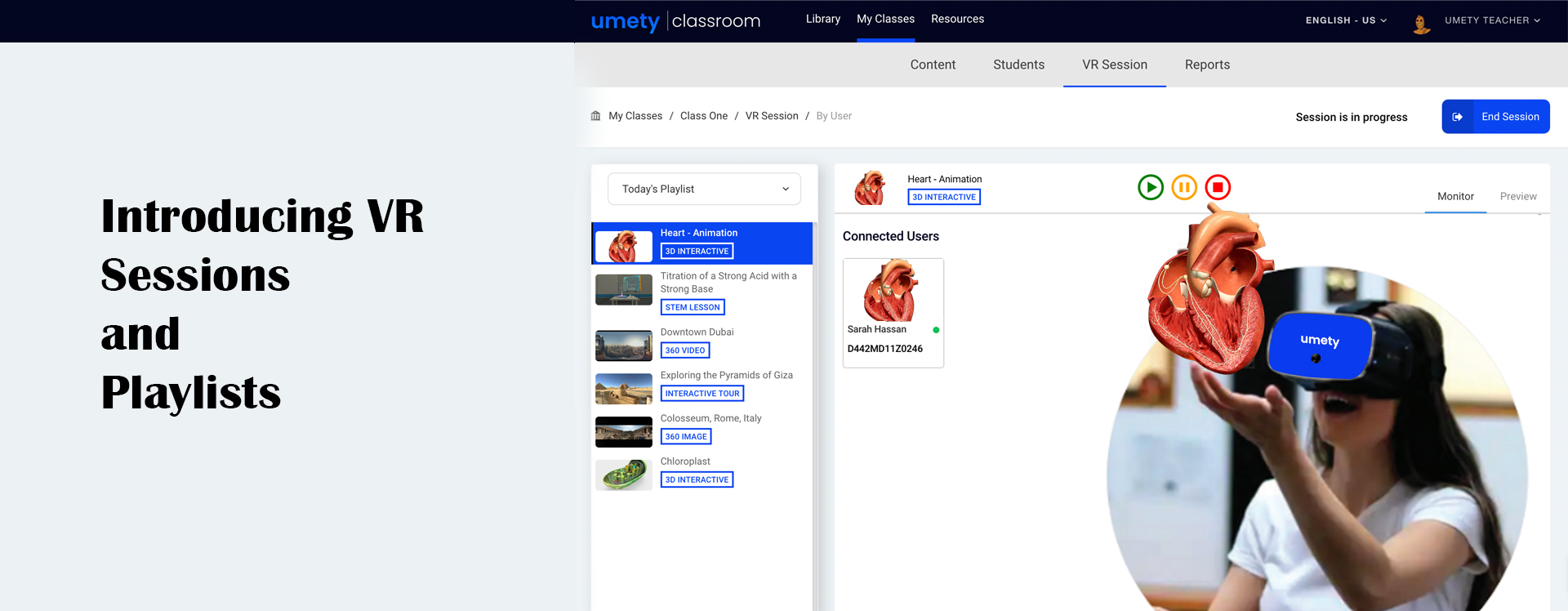
“My VR Lab” is now called “VR Session” and includes a number of great new features for teacher-led instruction:
There are now two types of VR Sessions - the familiar user-based option that is part of the My Class experience, and a new device-based session, allowing students to easily join a teacher-led, shared VR experience without having to sign in with a user account. Content within a class can be organized into playlists for easy delivery in the classroom. Teachers can see what students are seeing in their devices, wherever they are in the app, not just when they are playing learning content. Our engineering team has been hard at work optimizing the system to make sure VR sessions run smoothly and reliably in the classroom.
What to expect
Starting July 1, you will see new features appear in the online platform at app.umety.com and you will be prompted to install a quick update on each of your VR devices.
Warm regards,
Team Umety
|
|
|
|
|
|
|
|
|
|
|
|
|
|
|
|
|
|
|
|
|

.jpg)